Two-Week Workshop, Dates Offered:
Session 4 (8/3/26 – 8/14/26)
Tuition: $1999
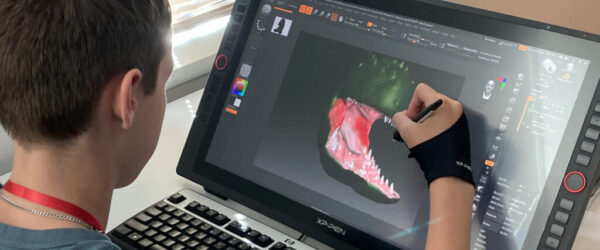
Movie monsters, playable game characters, and collectible figures all start as digital sculptures. Professional artists use ZBrush to design creations for blockbuster films and AAA games, transforming imagination into detailed 3D models that can be printed, animated, or manufactured – making digital sculpting one of the most versatile skills in modern creative industries.
Innovators will sculpt and bring to life their own characters – designing personalities, crafting details, and shaping forms from imagination to physical reality. Students learn industry-standard tools while discovering how to transform ideas into tangible figures, from initial concept to poses and finishing touches to the final 3D print. Their ProjectFUN character becomes something they can share and play with in a tabletop game – proof they can turn what they envision into something real.
Projects in this workshop may include: Producing a 3D-printed, magnetic monster head or designing and modeling a Dungeons & Dragons figure.
-
- Creating a character from design through completion
- The use of Zbrush for sculpting, full body posing, prop work, and poly painting
- Modeling a character to be optimized for 3D printing

-
- Graphics tablet
- Elegoo Saturn 2 8k resin 3D printer
- ZBrush digital sculpting tool
- KeyShot 3D rendering software
- Lychee 3D slicing software
-
- This workshop’s curriculum has been reviewed by a panel of college-level faculty from DigiPen Institute of Technology to ensure its relevance and appropriateness for students aged 14–18.
- As with every Innovator-level Open World workshop, a special visit by an industry guest has been arranged to help students see the connection between their workshop and real-world careers.

I like having the opportunity to learn more skills to apply to my art.
Parent of an Innovator
Register Now!
Using the CampInTouch Registration Portal
To register, head to Open World’s new CampInTouch registration portal and create an account. After signing up, choose your desired event/workshop and session.
If you’ve signed up for an Open World event or workshop before, you may be prompted to reset/create a password first, as we already have some of your required information on file.
If you’re a returning CampInTouch user, head directly to the CampInTouch log-in page to make changes to registrations, complete forms, or register for additional workshops.